An all-in-one Windows cleanup, optimization, security, and recovery suite. Built with Python & CustomTkinter, featuring a safety-first workflow: Scan → Review → Approve.
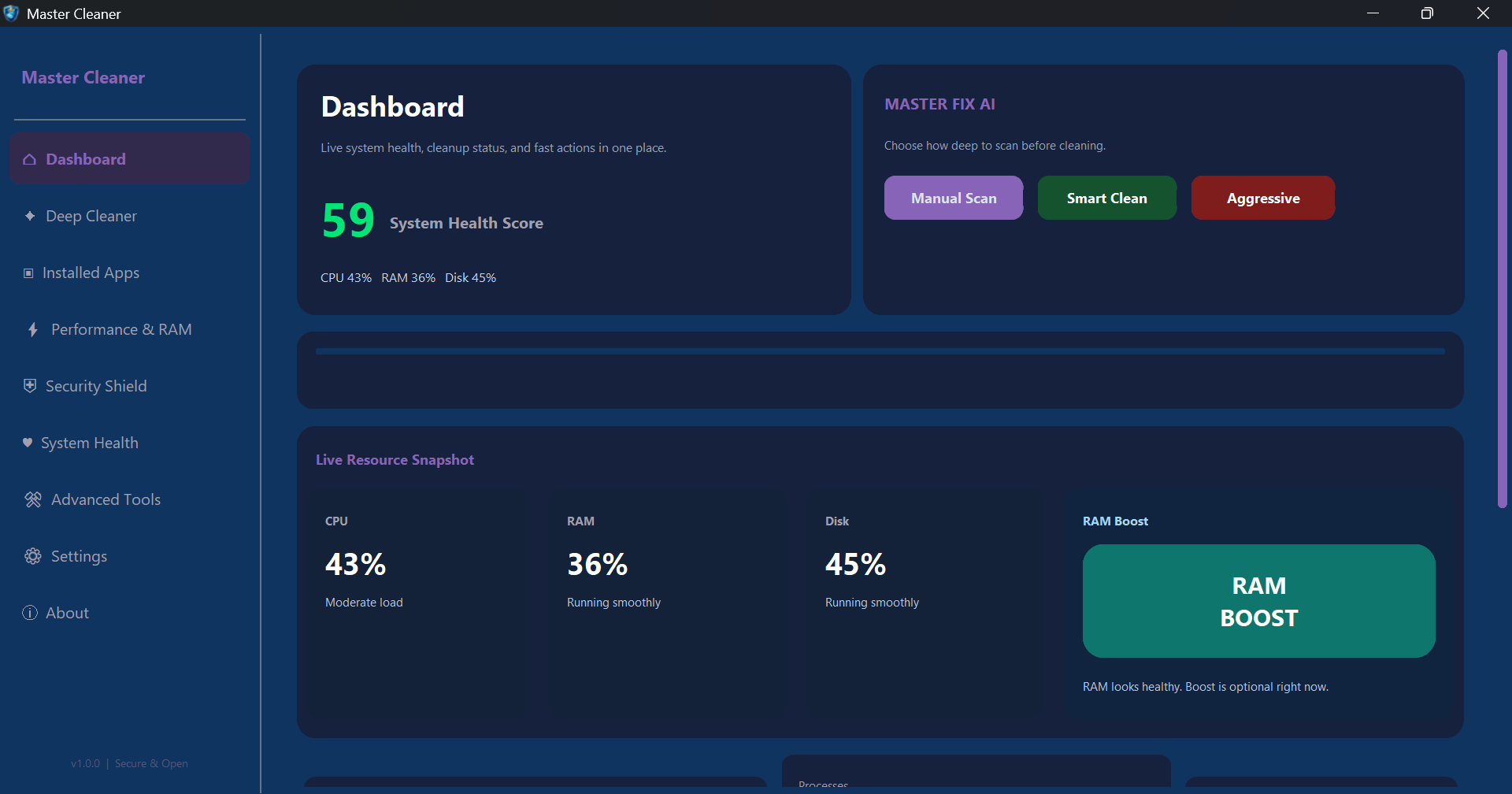
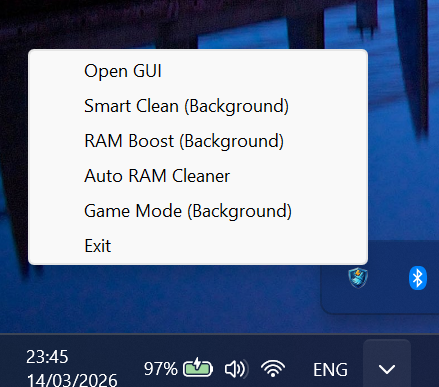
See Master Cleaner in action — the dashboard, system tray integration, and more.
Dashboard — Live system health, resource monitoring & Master Fix AI
System Tray — Quick actions from the taskbar
Core Features
Everything You Need
Master Cleaner combines deep cleaning, performance tuning, security scanning, system health monitoring, advanced utilities, and recovery — all in one app.
📊
Dashboard
Live health scoring, CPU/RAM/disk/network monitoring, Master Fix quick-launch, RAM Boost, and embedded activity log. Keyboard shortcut: Ctrl+M.
🧹
Deep Cleaner
Browser cache cleanup for Chrome, Edge, Brave, Firefox & more. System temp files, prefetch, bloatware removal. Risk-based labeling & age-based file protection.
📦
Installed Apps
Full program inventory with search, multi-select uninstall, AppX/UWP package removal, and post-uninstall leftover folder detection.
⚡
Performance
DNS cache flushing, Winsock reset, registry orphan scanning & repair, startup manager, Game Mode toggle, and smart RAM cleanup.
S.M.A.R.T. disk diagnostics, battery info & cycle counting, Windows SFC (sfc /scannow) integration, and DISM /RestoreHealth capability.
🔧
Advanced Tools
DoD 5220.22-M secure file shredding, duplicate finder, large file detection, empty folder locator, disk space mapping, broken shortcuts & context menu editor.
⚙️
Settings & Config
Theme & accent colors, VirusTotal API key, smart scan scheduling, Windows startup integration, auto RAM cleaner, backup & quarantine management.
Deep Dive
Module Details
Explore each module in detail. Click on a tab to learn more.
🌐
Browser Cache Cleanup
Supports Chrome, Edge, Brave, Chromium, Vivaldi, Opera, Opera GX, and Firefox. Only targets known cache paths for safety.
🗑️
System Temp & Prefetch
Removes temporary files and prefetch data. Age-based protection keeps recent files safe. Locked files are skipped with retry option.
🧩
Bloatware Removal
Identify and remove pre-installed bloatware. Parallel scanning for speed. Risk-based labeling shows what's safe to remove.
📦
Recovery Archives
Create ZIP archives of files before deletion. Restore deleted files from Settings at any time.
🌐
DNS & Network Reset
Flush DNS cache and reset Winsock for faster network performance and resolving connectivity issues.
🗄️
Registry Repair
Scan for orphaned registry entries and safely repair them. Automatic registry backup before any changes.
🚀
Startup Manager
View and manage programs that launch at Windows startup. Disable unnecessary apps to speed up boot time.
🎮
Game Mode & RAM
Toggle Windows Game Mode for optimal gaming performance. Smart RAM cleanup frees memory instantly.
🔬
YARA Threat Scanning
Scan files with YARA rules to detect malware signatures, suspicious patterns, and known threats.
🔒
File Quarantine
Isolate suspicious files in a secure quarantine zone. Restore or permanently delete quarantined files.
🦠
VirusTotal Integration
Submit files to VirusTotal for multi-engine scanning using your API key. View results from 70+ antivirus engines.
🔐
Privacy & Telemetry
Control Windows telemetry settings and privacy options. Reduce data collection for enhanced privacy.
💾
S.M.A.R.T. Disk Diagnostics
Read S.M.A.R.T. data from drives for health assessment. Detect failing disks before data loss occurs.
🔋
Battery Health
View battery information including charge cycles, capacity, and health status for laptop users.
🛠️
SFC & DISM
Run Windows System File Checker (sfc /scannow) and DISM /RestoreHealth to repair corrupted system files.
🔥
DoD File Shredder
Securely delete files using the DoD 5220.22-M standard with 7-pass overwriting. Unrecoverable deletion.
📂
Duplicate Finder
Scan for duplicate files by content hash. Free up disk space by removing redundant copies.
📊
Disk Space Mapping
Large file detection, empty folder finder, and disk space analysis by file type. Visualize what's using your storage.
🔗
Shortcuts & Context Menu
Find and fix broken shortcuts. Edit the Windows right-click context menu entries.
📋
Process Monitor
Auto-refreshing process list with CPU/RAM metrics. Kill processes, open file location, or look up processes online.
🌐
Network Guard
Live network connections monitor with suspicious-activity filtering, auto-refresh, and file inspection capabilities.
📌
System Tray
Minimize to system tray with quick actions: Quick Clean, RAM Boost, Auto RAM Cleaner toggle, and Game Mode toggle.
Safety First
Built for Safety
Master Cleaner implements multiple protective mechanisms to keep your system safe during every operation.
✓
Review-before-delete for all operations
✓
Risk-based scoring for identified issues
✓
Critical Windows path blocking
✓
Drive root protection
✓
Symlink following prevention
✓
Automatic registry backup before repair
✓
Recovery archive creation before deletion
✓
Audit log of all destructive actions
✓
Executable & sensitive file protection
✓
Configurable file age thresholds
✓
Locked file skip/retry handling
✓
Browser cleanup restricted to known cache paths
Multi-Language
Supported Languages
Master Cleaner supports 5 languages with full RTL support for Hebrew.
🇬🇧 English
🇮🇱 Hebrew
🇪🇸 Spanish
🇷🇺 Russian
🇫🇷 French
Download
Get Master Cleaner
Choose the version that works best for you. Both are completely free.
📥
Setup Installer
Recommended. Full installation with desktop shortcut and Start Menu entry. Guided setup wizard.
Note: Built with PyInstaller — Windows Defender may show a false positive. This is normal for Python-based executables. Full source code on GitHub for transparency.
System Requirements
What You Need
Operating System
Windows 10/11
Python (Dev)
3.10+
Price
Free
Data Storage
%APPDATA%
Source
Open Source
Ready to Clean?
Download Master Cleaner and take control of your Windows system. Free, open source, and built with safety in mind.